Checking your Emirates ID status online helps you find out whether your new card, renewal, or replacement application is progressing. The Federal Authority for Identity, Citizenship, Customs & Port Security (ICP) provides an official online service for this purpose.
You generally need your application number (PRAN), existing Emirates ID number (IDN), or another reference accepted by the relevant ICP service.
This guide explains how to check your application status, track an Emirates ID through other official channels, locate a missing reference number, understand status updates, and check what happens after your card is issued. It also explains why an Emirates ID status check is different from checking your UAE residence visa.
Quick Answer: Check Emirates ID Status Online
To check your Emirates ID status, visit the official ICP ID Card Status page. Enter your application number (PRAN), or your Emirates ID number (IDN) if you are checking an applicable renewal or replacement request. Select Check Application Status to view the available information and follow any further instructions.
Which Official Service Should You Use?
Not every identity-related enquiry uses the same government service. Choose the correct starting point based on what you need to check.
| What You Want to Check | Official Starting Point | Information You May Need |
|---|---|---|
| New Emirates ID application | ICP ID Card Status | PRAN or accepted request reference |
| Emirates ID renewal or replacement | ICP ID Card Status | Existing IDN or supported request number |
| Application submitted through your own ICP account | ICP Smart Services | Authorized account access |
| Application tracked through Smart Services | ICP Smart Services | Relevant application number |
| Existing Emirates ID information or validity | Applicable authenticated ICP service | Details requested by that service |
| UAE residence visa status | Relevant ICP or GDRFA immigration service | Appropriate visa or immigration reference |
| Physical Emirates ID delivery | Delivery provider identified in your notification | Courier tracking or delivery reference |
An application may be approved without the physical card having reached its recipient. Checking the application and checking courier delivery are therefore different tasks.
How to Check Emirates ID Status Through ICP
The official ICP ID Card Status service provides a straightforward way to check an Emirates ID application online.
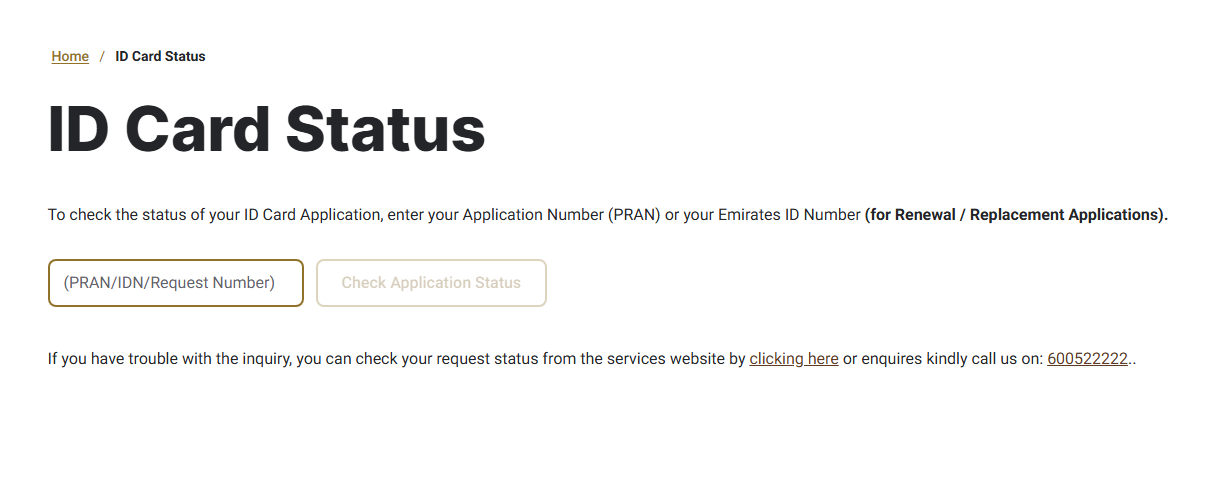
Step 1: Visit the Official ICP Website
Open the ICP ID Card Status service.
Check that the website address belongs to the official ICP website icp.gov.ae before entering your information.
The page is titled ID Card Status and provides a field for the relevant application or identity number.
Step 2: Find the Correct Reference Number
The official form displays a field labeled PRAN/IDN/Request Number.
For a new application, use the application number (PRAN). For an applicable renewal or replacement, ICP says you can use the existing Emirates ID number.
The form also references request numbers. Use one only when it is appropriate for the enquiry.
Do not enter unrelated details, such as your passport number, into this field.
Step 3: Enter Your Number Carefully
Type the relevant reference exactly as shown in your official application documents.
Check for missing digits, extra spaces, or typing errors.
If someone else submitted the application, ask that person or organization for the official reference.
Step 4: Select Check Application Status
Select Check Application Status on the ICP page.
The service will process the enquiry and display the information available for that reference.
If the enquiry cannot be completed, ICP also directs users to its Smart Services website or official support channels.
Step 5: Read the Result
Review the status and any instructions displayed.
Pay attention to whether the result concerns application processing, an additional requirement, or card issuance.
Do not assume that an approved application means the physical card has already been delivered.
Step 6: Follow the Relevant Next Action
If the result identifies an outstanding requirement, follow the official instructions or contact the organization that submitted your application.
If the application has progressed to card dispatch, use the authorized delivery information provided to you.
For additional assistance, the ICP ID Card Status page lists 600522222 as its contact number within the UAE.
Which Number Do You Need to Check Emirates ID Status?
Different government services use different identifiers. Knowing which one to enter can prevent an unsuccessful search.
| Reference | What It Is | When to Use It |
|---|---|---|
| PRAN | Application number associated with an Emirates ID application | New application tracking through the relevant ICP service |
| IDN | Emirates ID number | Applicable renewal or replacement status enquiries |
| Request number | Reference associated with a government service request | When accepted by the specific ICP service |
| Smart Services application number | Application tracking reference used in the Smart Services system | Tracking through the applicable Smart Services option |
| Passport number | Travel document number | Certain separate immigration enquiries, not the standard ICP ID Card Status field |
What Is a PRAN Number?
PRAN refers to the application number used for the relevant Emirates ID status enquiry. It helps the government service identify the application being checked.
Applicants should look for it on their official application receipt or confirmation.
What Is an IDN?
IDN refers to the Emirates ID number associated with an existing card.
ICP identifies this number as an accepted input for applicable renewal and replacement enquiries on its Card Status page.
Is Every Application Number the Same?
No. Different services may issue different reference numbers.
For example, ICP’s FAQ describes a Smart Services tracking method using an application number that starts with 010. That instruction belongs to the relevant Smart Services tracking route.
It should not be interpreted as proof that every Emirates ID application reference follows the same format.
Other Official Ways to Track Your Emirates ID Application
The public ID Card Status page is not the only official way to check an application.
ICP also documents authenticated account tracking, Smart Services application tracking, and direct assistance.
Track Through ICP Smart Services
Visit ICP Smart Services.
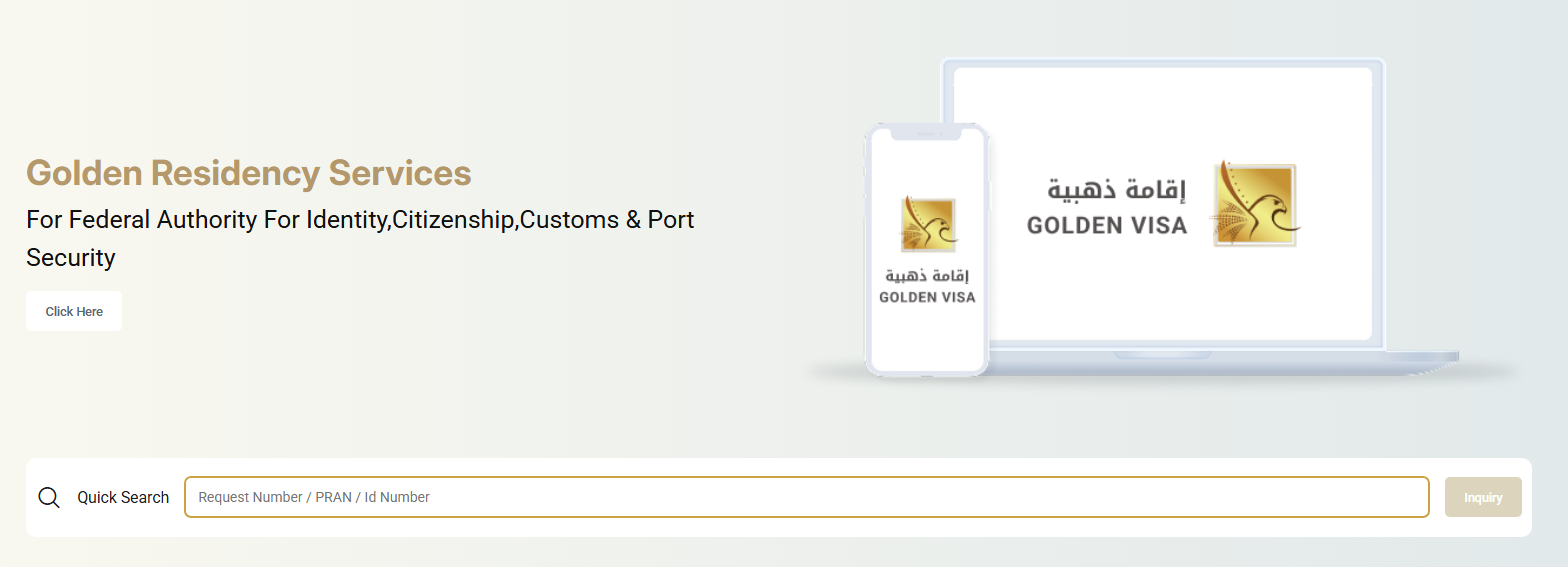
ICP’s FAQ explains that applicants can select the application tracking option, enter the relevant application number beginning with 010, and search for the application.
Use the application number issued for that particular service. Do not substitute a passport number or assume that another reference is interchangeable.
The Smart Services platform also provides a quick-search facility for supported request, PRAN, or ID references. Follow the field instructions shown for the enquiry you are making.
Note: This page also lists Golden Residency Visa services, but the web portal works for all UAE residents.
Check My Applications / My Requests
If you submitted your request through your own ICP account, you may be able to review it within My Applications / My Requests.
Sign in through the official Smart Services platform using an authorized login method.
Find the relevant submitted request and inspect its available status.
This route is particularly useful when you need to review the application from the account used to create it.
However, an application submitted through an employer, sponsor, or typing center may have been filed from a different account. It may not necessarily appear in your personal request list.
Track Through the UAEICP App
ICP also provides the official UAEICP mobile application. The official UAEICP app allows UAE residents and applicants to access government identity services and check the progress of eligible Emirates ID applications using a mobile phone.
The application supports identity and residency services, application tracking, notifications, and access to available government documents.
Users can sign in through supported authentication methods, including UAE PASS, and check the relevant services available to their account.
App menus and access permissions can change. Follow the options displayed in the current official application.
Step 1: Download the UAEICP App
Install the application from an official source:
Android: Download UAEICP from Google Play
iPhone: Download UAEICP from the Apple App Store
Search for UAEICP and confirm that the developer is the Federal Authority for Identity and Citizenship or ICP.
Step 2: Open the App and Sign In
After installation, open UAEICP and select Sign in with UAE PASS. Complete the authentication request through your UAE PASS account.
If the app offers an alternative account login, users with existing credentials may sign in using the supported method.
Step 3: Find Your Applications
Once signed in, open My Requests or My Applications, depending on the options displayed in your app version. Find the Emirates ID application associated with your account.
Step 4: Check the Application Status
Select the relevant request to review its available status information. Follow any additional instructions displayed by the official application.
Step 5: Check for Further Updates
Enable notifications for UAEICP in your phone settings if you want to receive supported application updates and alerts.
If an employer, sponsor, or typing center submitted the application through another account, it may not appear in your personal request list. In that case, obtain the application reference from the submitting provider and use the official ICP ID Card Status service where applicable.
Note: App menus may change with updates. The official ICP website remains an alternative for checking applications when the request cannot be located in the mobile app.
Contact ICP for an Application Update
If you cannot retrieve your application information online, contact ICP through its official support channel.
Be prepared to provide the appropriate reference privately through the government channel.
Avoid posting identity information, application receipts, or login details in public forums.
Where to Find Your Emirates ID Application Number?
If you cannot locate your application number, begin with the documents and records associated with the original submission.
Check your application receipt. The receipt or transaction confirmation may contain a reference number used to identify the request.
Review the original application confirmation. If you applied online, check the confirmation available through the authorized channel you used.
Check your ICP account. For applications submitted through your personal account, inspect the relevant requests.
Ask your employer or sponsor. If an organization submitted your Emirates ID request as part of a residency procedure, ask its authorized representative for the application reference.
Contact the typing center. If an accredited typing center submitted the application, request the relevant confirmation or receipt from that center.
Contact ICP. If these methods do not resolve the issue, use the official support service.
Example: A New Applicant Cannot Find PRAN
A first-time applicant receives confirmation that an application was submitted but cannot find the PRAN.
The practical next step is to review the application receipt and confirmation. If an employer or typing center handled the submission, the applicant should request the official reference from that provider rather than repeatedly entering unrelated numbers into the tracking page.
This is a hypothetical example, not an actual applicant case.
Emirates ID Tracking for New Applications
A new Emirates ID application can be checked through the official ICP status page using the applicable application reference.
Once an application has been submitted, the applicant should retain the receipt and confirmation details.
To track a new application:
- Obtain the official PRAN or supported request reference.
- Open the ICP ID Card Status service.
- Enter the reference in the designated field.
- Submit the enquiry.
- Review the result and follow any instructions.
If an applicant must still complete an identity-related requirement, such as an applicable biometric procedure, checking the status does not replace that requirement.
For requests submitted through another organization, confirm whether additional action is needed with the original submitting provider.
Avoid submitting a duplicate application simply because a status is not immediately available.
For applicants obtaining UAE residency through freelance work, the freelance permit, residence visa, and Emirates ID application are separate parts of the process. The freelance visa in Dubai guide explains how these requirements relate to one another, while Emirates ID tracking remains available through the applicable ICP service.
How to Track Emirates ID Renewal and Replacement
Renewal and replacement requests can also be followed through official ICP services.
Emirates ID Renewal Status
For an applicable renewal application, ICP permits the existing Emirates ID number to be used on the ID Card Status page.
Open the service, enter the accepted number, and review the available result.
If the renewal was submitted through an employer or typing center, retain the related request confirmation so the application can be identified if assistance is required.
Renewal processing and delivery are separate from determining whether the previous card has expired.
Emirates ID Replacement Status
Applicants requesting a replacement for a lost or damaged card should use the appropriate existing IDN or accepted request reference.
The tracking enquiry does not replace the original replacement application.
If the system does not show the expected request, check the submission confirmation and contact the original service channel or ICP.
Example: Incorrect Renewal Reference
A resident enters an unrelated transaction number while trying to check an Emirates ID renewal.
If the lookup does not return the expected application, the resident should review the actual renewal receipt and use the reference accepted by ICP. An unsuccessful enquiry does not by itself establish that the renewal was rejected.
This example is illustrative.
Emirates ID Status Messages Explained
Application status results can help applicants understand progress, but the exact wording and stages may differ between services.
The following table explains general progress concepts. These are illustrative descriptions, not a guaranteed list of exact ICP status messages.
| Status Concept | What It Generally Indicates | Recommended Next Action |
|---|---|---|
| Application submitted | A request has been recorded | Keep the reference and monitor official updates |
| Under review | The request is being processed or checked | Review official notifications and outstanding requirements |
| Additional action required | More information or a procedure may be needed | Follow the specific instruction displayed |
| Approved | The relevant application stage has been approved | Check whether card issuance or production information is available |
| Card production | The card may be in a production stage | Wait for the next official update |
| Dispatched | The card may have been handed to a delivery channel | Use the authorized delivery details provided |
| Delivered | Delivery has been recorded | Verify receipt through the relevant official or authorized channel |
A status result should be interpreted together with its actual instructions.
For example, an approval indication is not necessarily confirmation that a physical card is ready for collection. Similarly, a courier update cannot establish the validity of a residence visa.
When an unfamiliar message appears, use ICP support rather than relying on an unofficial interpretation.
How to Track Printed and Dispatched Emirates ID Cards
Emirates ID tracking can involve two distinct stages: government application processing and physical card delivery.
Checking Whether the Card Has Been Printed
Start with the official ICP application-status enquiry.
Look for information indicating that the application has progressed beyond its earlier processing stages.
Not every status result necessarily provides a separate printing message. If it is unclear whether production has been completed, use the official support channel.
Tracking Card Dispatch
Once a card has been dispatched, the authorized delivery service may provide separate delivery information.
Check the official notification or communication sent regarding the card.
Use the delivery reference and provider identified in that communication.
Do not assume every Emirates ID delivery is managed by the same courier company.
What if the Card Has Not Arrived?
First, confirm whether the card was actually dispatched.
Next, check any delivery notification and the contact details associated with the request.
If a delivery reference was supplied, follow the instructions of the identified provider.
Where the courier information is missing or unclear, contact ICP or the original application provider for guidance.
Example: Card Dispatched but Not Delivered
An applicant receives an update suggesting that the card has been dispatched but has not received it.
The applicant should check for the authorized delivery notification, verify the delivery reference, and contact the relevant delivery provider. If no courier details can be located, the applicant can seek guidance from ICP.
This is a hypothetical example.
Can You Check Emirates ID Status With a Passport Number?
The standard ICP ID Card Status page does not list passport number as an accepted tracking input.
Its public enquiry field is labeled PRAN/IDN/Request Number.
For a new Emirates ID application, ICP directs applicants to use their application number. For applicable renewal or replacement requests, the existing Emirates ID number may be used.
Some separate immigration services may accept passport details for visa-related enquiries. However, those services do not necessarily show the production or delivery status of an Emirates ID card.
If you only have your passport number, locate the relevant Emirates ID application reference through your receipt, account, employer, sponsor, or submitting center.
Do not confuse visa verification with card tracking.
Emirates ID Validity vs Application Status
An Emirates ID application status check is different from verifying whether an existing identity card or residence visa remains valid.
| Enquiry | What It Helps Establish | Appropriate Starting Point |
|---|---|---|
| Emirates ID application status | Progress of a submitted card request | ICP ID Card Status |
| Existing Emirates ID validity | Details or validity of an issued identity card | Relevant authenticated ICP identity service |
| UAE residence visa validity | Immigration permission and validity details | ICP or GDRFA, depending on the issuing emirate |
| Physical card delivery | Courier or handover progress | Authorized delivery information |
According to the UAE Government’s visa-tracking guidance, visa application and validity enquiries for Abu Dhabi, Sharjah, Ajman, Umm Al Quwain, Ras Al Khaimah, and Fujairah are directed to ICP.
For Dubai-issued visas, the official guidance directs applicants to GDRFA Dubai.
These differences concern immigration enquiries. The ICP ID Card Status service remains the relevant starting point for checking an Emirates ID application. Residents who are unsure whether an expired or canceled residence visa affects their permitted stay can review the separate rules on UAE visa overstay fines and grace periods. An Emirates ID application status result does not confirm a person’s immigration validity or overstay position.
How Long Does Emirates ID Processing Take?
Emirates ID processing time depends on the service, whether all requirements have been completed, and the stage of the request.
ICP’s published New Identity Card Issuance service information lists a five-day service completion duration. That figure relates to the published service standard and should not be treated as a guaranteed end-to-end delivery period for every applicant.
The overall journey may involve several separate stages:
- Application submission and verification.
- Any required identity procedures or additional documents.
- Government processing and card issuance.
- Physical card production.
- Dispatch and delivery.
An applicant who has not yet completed a required procedure may experience a different timeline from one whose requirements are complete.
Courier delivery may also involve separate arrangements.
Rather than assuming a universal number of days, applicants should check their actual status and any official instructions associated with the request.
If the application is delayed or no update is available, contact ICP or the original submitting provider with the correct application reference.
What to Do if Your Emirates ID Status Is Not Updating
An unsuccessful enquiry or unchanged status does not always mean an application has been rejected.
Start by identifying the specific problem.
| Problem | Possible Explanation | What to Do Next |
|---|---|---|
| Reference number not recognized | Incorrect or unsupported number entered | Check the original receipt and use the correct reference for the service |
| No record found | Wrong service, reference error, or request not available through that lookup | Confirm the submitted application and contact the original provider or ICP |
| PRAN is missing | Applicant does not have the relevant receipt | Check confirmations or request the number from the submitting provider |
| Application absent from My Requests | Request may have been submitted through another account | Ask the employer, sponsor, or typing center that submitted it |
| Status remains under process | Government processing or another requirement may still be pending | Check official notifications and contact ICP if clarification is needed |
| Additional information requested | The application may require further action | Follow the instructions displayed by the official service |
| Card issued but not received | Delivery may be handled separately | Check the authorized delivery notification |
| Portal is not displaying results | Temporary technical issue or an unsuitable enquiry route | Retry through the official service or use another supported ICP channel |
When No Record Is Found
Review the application confirmation before assuming something has gone wrong.
Check whether the number belongs to the ID Card Status page or to another Smart Services application-tracking route.
If an employer or typing center submitted the application, confirm that it was successfully submitted and obtain the correct tracking details.
Avoid creating a second application without first confirming the status of the original request.
When an Employer Submitted the Application
An employer may submit identity and residency-related requests through its authorized organizational channels. Employees checking related employment records can use the appropriate MOHRE enquiry services, although Emirates ID applications and work permit enquiries are handled by different government authorities.
The employee may therefore need the official reference from the employer rather than expecting the application to appear in a personal ICP account.
The public status-check tool can then be used where the supplied reference is supported.
For business owners and employers managing UAE residency applications, private consultancies may assist with visa documentation and government-related procedures. Incorpyfy, a Dubai-based business setup consultancy, lists visa processing, PRO services, and immigration documentation support among its services. Emirates ID application status checks remain available through the official ICP channels, and applicants should use those services for accurate updates.
How to Access Digital Emirates ID Through UAEICP?
ICP provides digital identity-related features through its official mobile services.
Its published UAEICP application information includes:
- Secure access using UAE PASS.
- Identity and residency services.
- Application tracking.
- Notifications.
- A digital wallet for official documents.
ICP’s FAQs state that an electronic version of the ID can be viewed through the ICP application after the ID card has been issued. The FAQ also refers to digital ID access through UAE PASS.
To check available documents, use the official UAEICP application, sign in through an authorized method, and inspect the documents available to your account.
Do not assume that submitting an application or receiving an approval update immediately makes the digital ID available.
Acceptance of a digital document may also depend on the requirements of the organization requesting identification.
For official information, visit the UAEICP Mobile Smart App page.
When Should You Contact ICP?
Contact ICP when you cannot identify the correct application reference, cannot retrieve a submitted request through supported methods, or need clarification about an official status message.
Official help is also appropriate when a required procedure is unclear, or the card’s delivery information cannot be established.
The ICP ID Card Status page lists the following support number:
600522222 (within the UAE)
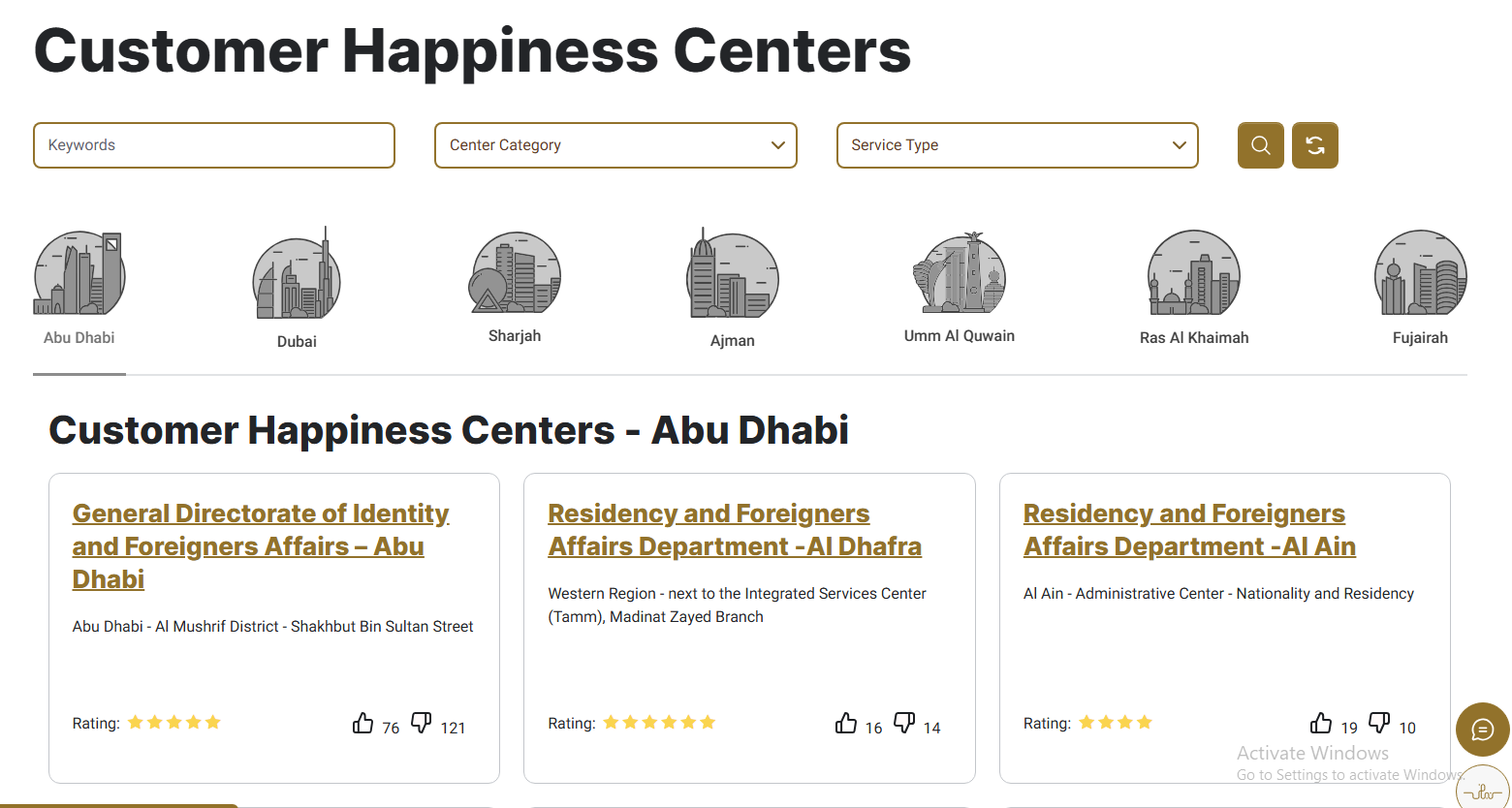
ICP also provides assistance through its ICP Smart Service Centre Locator, through which you can find the nearest Customer Happiness Centre.
When seeking assistance, keep your reference number and application documents available, but share them only through the authorized government channel.
Avoid paying an unknown third party to check a status that can be requested through official services.
Emirates ID Status Checking Checklist
Before checking your Emirates ID status, confirm the following:
- You are using an official ICP website or application.
- You know whether the request is new, renewed, or a replacement.
- You have the correct PRAN, IDN, or accepted request reference.
- You are using the government service that accepts your reference.
- You have reviewed the actual status message and next steps.
- Any required additional procedure has been addressed.
- Courier information is checked separately after dispatch.
- Personal identity details are shared only through official channels.
- Unresolved enquiries are directed to ICP or the original application provider.
Following this checklist can help avoid repeated searches with incorrect numbers or the wrong government service.
Check Your Emirates ID Status Through Official Channels
The most reliable starting point for an Emirates ID status check is the official ICP ID Card Status service. Use the appropriate application number for a new request or the accepted ID number for an applicable renewal or replacement.
If the public enquiry does not provide the information you need, ICP also offers Smart Services tracking, personal-account requests, mobile services, and official support.
Keep application tracking, card validity, residence visa status, and physical delivery separate. Each enquiry answers a different question and may require a different reference.
Checking the correct service and following its actual instructions is more useful than relying on general delivery estimates or unofficial tracking methods.
Frequently Asked Questions
1. How can I check my Emirates ID status online?
Visit: ICP ID Card Status, enter your accepted PRAN, IDN, or request reference, and select Check Application Status.
2. What is a PRAN number?
PRAN is the application number used for an applicable Emirates ID application enquiry. It may be available on the official application receipt or confirmation.
3. What is the difference between PRAN and IDN?
PRAN identifies an application. IDN refers to an existing Emirates ID number. ICP permits IDN use for applicable renewal or replacement status enquiries.
4. Can I check Emirates ID status using my passport number?
Not through the standard ICP ID Card Status form, which lists PRAN/IDN/request number. Passport information may be relevant to a separate immigration enquiry, but that is not the same as Emirates ID card tracking.
5. Where can I find my Emirates ID application number?
Check your official application receipt, submission confirmation, or relevant ICP account. If an employer, sponsor, or typing center submitted the request, ask that provider for the reference.
6. How do I track Emirates ID renewal?
Use the ICP ID Card Status page with your existing Emirates ID number or another applicable accepted request reference.
7. Why is my application not visible in My Requests?
The application may have been submitted through another account, such as an employer’s or typing center’s account. Obtain the submission reference from the original provider and use the appropriate tracking service.
8. What should I do if ICP shows no record found?
Check the number, confirm that the application was submitted, and make sure you are using the correct enquiry service. If the problem remains, contact ICP or the submitting provider.
9. How can I check whether my Emirates ID has been printed?
Check the official application status information. If the result does not clearly establish the production stage, contact ICP for clarification.
10. How can I track physical Emirates ID delivery?
Use the authorized delivery notification or tracking reference issued for your card. Courier tracking is separate from the government’s application-status enquiry.
11. Can I use a digital Emirates ID while waiting for the physical card?
ICP says the electronic ID can be viewed after the card has been issued. Availability in the official application does not necessarily mean every organization will accept it for every transaction.
12. Is checking Emirates ID application status free?
The public ICP ID Card Status page does not display a fee for submitting a status enquiry. This does not mean issuance, renewal, replacement, or any related services are free.